概述 Netty是什么? Netty是一个异步的、基于事件驱动的网络应用框架,用于快速开发可维护、高性能的网络服务器和客户端
Netty的作者
Netty的地位 Netty在java网络应用框架中的地位就好比Spring框架在JavaEE开发中的地位
Cassandra - nosql数据库
Spark - 大数据分布式计算框架
Hadoop - 大数据分布式存储框架
RocketMQ - ali 开源的消息队列
ElasticSearch - 搜索引擎
gREC - rpc框架
Dubbo - rpc框架
Spring 5.x - flux api完全抛弃了tomcat,使用netty作为服务端
Zookeeper - 分布式协调框架
Netty的优势
Netty vs NIO,工作量大,bug多
需要自己构建协议
解决TCP传输问题,如黏包、半包
epoll空轮询导致CPU 100%
对API进行增强,使之更易用,如FastThreadLocal => ThreadLocal,ByteBuf => ByteBuffer
Netty vs 其他网络应用框架
Mina由apache维护,将来3.x版本可能会由较大重构,破坏API向下兼容性,Netty的开发迭代更迅速,API更简介、文档更优秀
久经考验,16年,Netty版本
2.x 2004
3.x 2008
4.x 2013
5.x 已废弃(没有明显性能提升,维护成本高)
Hello World 目标 开发一个简单的服务端和客户端
客户端向服务端发送 hello、world
服务端仅接收,不反回
加入依赖
1 2 3 4 5 <dependency > <groupId > io.netty</groupId > <artifactId > netty-all</artifactId > <version > 4.1.72.Final</version > </dependency >
服务器端 1 2 3 4 5 6 7 8 9 10 11 12 13 14 15 16 17 18 19 20 21 22 23 24 25 26 27 28 29 30 31 32 33 34 35 36 37 38 39 40 41 public class HelloServer public static void main (String[] args) new ServerBootstrap() .group(new NioEventLoopGroup()) .channel(NioServerSocketChannel.class) .childHandler( new ChannelInitializer<NioSocketChannel>() { @Override protected void initChannel (NioSocketChannel ch) throws Exception ch.pipeline().addLast(new StringDecoder()); ch.pipeline().addLast(new ChannelInboundHandlerAdapter(){ @Override public void channelRead (ChannelHandlerContext ctx, Object msg) throws Exception System.out.println(msg); } }); } }) .bind(8080 ); } }
客户端 1 2 3 4 5 6 7 8 9 10 11 12 13 14 15 16 17 18 19 20 21 22 23 24 25 26 27 28 29 30 31 32 33 34 35 public class HelloClient public static void main (String[] args) throws InterruptedException new Bootstrap() .group(new NioEventLoopGroup()) .channel(NioSocketChannel.class) .handler(new ChannelInitializer<NioSocketChannel>() { @Override protected void initChannel (NioSocketChannel ch) throws Exception ch.pipeline().addLast(new StringEncoder()); } }) .connect(new InetSocketAddress("127.0.0.1" ,8080 )) .sync() .channel() .writeAndFlush("hello, world" ); } }
💡 提示
把channel理解为数据的通道
把msg理解为流动的数据,最开始输入是ByteBuf,但经过pipeline的加工,会变成其他类型对象,最后输出又变成ByteBuf
把handler理解为数据的处理工序
工序由多道,合在一起就是pipeline,pipeline负责发布事件(读、读取完成…)传播给每个handler,handler对自己感兴趣的事件进行处理(重写了相应事件处理方法)
handler分Inbound和Outbound两类
把eventLoop理解为处理数据的工人
工人可以管理多个channel的io操作,并且一旦工人负责了某个channel,就要负责到底(绑定)
工人既可以执行io操作,也可以进行任务处理,每位工人有任务队列,队列里可以堆放多个channel的待处理任务,任务分为普通任务、定时任务
工人按照pipeline顺序,以次按照handler的规划(代码)处理数据,可以为每道工序指定不同的工人
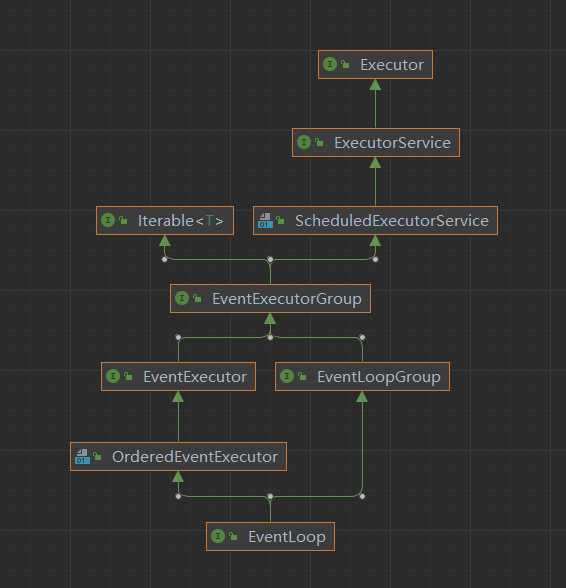
组件 EventLoop事件循环对象EventLoop本质是一个单线程执行器(同时维护了一个selector),里面有run方法处理Channel上源源不断的 io 事件
一条线是继承自j.u.c.ScheduledExecutorService 因此包含了线程池中所有的方法
另一条线是继承自netty自己的OrderedEventExecutor
提供了 boolean inEventLoop(Thread thread)方法判断一个线程是否是属于此EventLoop
提供了parent方法来看看自己属于哪个EventLoop
EventLoopGroupEventLoopGroup是一组EventLoop,Channel一般会调用EventLoopGroup的register方法来绑定其中一个EventLoop,后续整个Channel上的io事件都由此EventLoop来处理(保证了io事件处理时的线程安全)
继承自netty自己的EventExecutorGroup
实现了Iterable接口提供遍历EventLoop的能力
另有next方法获取集合中下一个EventLoop
以一个简单的实现为例:
1 2 3 4 5 // 内部创建了两个 EventLoop, 每个 EventLoop 维护一个线程 DefaultEventLoopGroup group = new DefaultEventLoopGroup(2); System.out.println(group.next()); System.out.println(group.next()); System.out.println(group.next());
输出:
1 2 3 io.netty.channel.DefaultEventLoop@60f82f98 io.netty.channel.DefaultEventLoop@35f983a6 io.netty.channel.DefaultEventLoop@60f82f98
也可以使用for循环调用:
1 2 3 4 DefaultEventLoopGroup group = new DefaultEventLoopGroup(2); for (EventExecutor eventLoop : group) { System.out.println(eventLoop); }
结论:group.next()获取事件循环对象,可以循环获取,比如现在多次调用获取对象,第一次和第三次获取的是一样的,第二次和第四次是一样的,以次类推,实现了一个轮询的效果
执行普通任务和定时任务 EventLoopGroup继承了线程池中的所有方法,所以本身就相当于一个线程池,执行普通任务直接使用submit方法或者execute方法提交任务即可,定时任务调用scheduleAtFixedRate方法执行。
1 2 3 4 5 6 7 8 9 10 11 12 13 14 15 16 17 18 19 20 21 22 23 24 25 26 27 28 29 30 31 @Slf4j public class TestEventLoop public static void main (String[] args) EventLoopGroup group = new NioEventLoopGroup(2 ); System.out.println(group.next()); System.out.println(group.next()); System.out.println(group.next()); System.out.println(group.next()); group.next().submit(()->{ try { Thread.sleep(1000 ); log.debug("ok" ); } catch (InterruptedException e) { e.printStackTrace(); } }); group.next().scheduleAtFixedRate(()->{ log.debug("ok" ); },0 ,1 , TimeUnit.SECONDS); log.debug("main" ); } }
💡 优雅地关闭 group的group.shutdownGracefully()方法。该方法会首先切换EventLoopGroup到关闭状态从而拒绝新的任务加入,然后在任务队列中的任务都处理完成后,停止线程的运行,从而确保整体应用是在正常有序的状态下退出的
NioEventLoop 处理IO事件
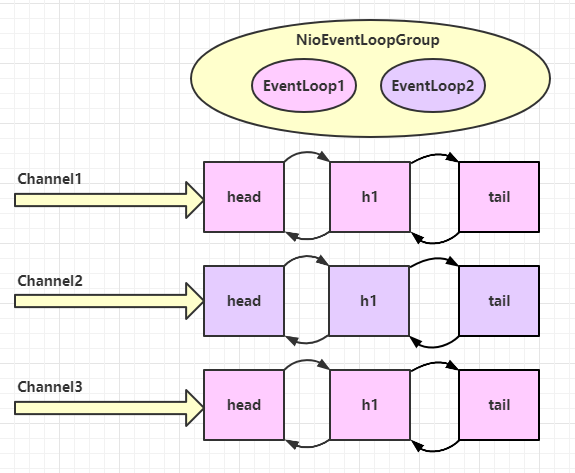
1 2 3 4 5 6 7 8 9 10 11 12 13 14 15 16 17 18 19 20 21 22 23 24 25 @Slf4j public class EventLoopServer public static void main (String[] args) new ServerBootstrap() .group(new NioEventLoopGroup(), new NioEventLoopGroup(2 )) .channel(NioServerSocketChannel.class) .childHandler(new ChannelInitializer<NioSocketChannel>() { @Override protected void initChannel (NioSocketChannel ch) throws Exception ch.pipeline().addLast(new ChannelInboundHandlerAdapter() { @Override public void channelRead (ChannelHandlerContext ctx, Object msg) throws Exception ByteBuf buf = (ByteBuf) msg; log.debug(buf.toString(Charset.defaultCharset())); } }); } }).bind(8080 ); } }
客户端启动多次,使用dubug模式多次调用
1 2 3 4 5 6 7 8 9 10 11 12 13 14 15 16 17 18 public class EventLoopClient public static void main (String[] args) throws InterruptedException Channel channel = new Bootstrap() .group(new NioEventLoopGroup()) .channel(NioSocketChannel.class) .handler(new ChannelInitializer<NioSocketChannel>() { @Override protected void initChannel (NioSocketChannel ch) throws Exception ch.pipeline().addLast(new StringEncoder()); } }) .connect(new InetSocketAddress("127.0.0.1" , 8080 )) .sync() .channel(); System.out.println(channel); System.out.println("" ); } }
输出:
1 2 3 4 5 6 7 8 11:37:14 [DEBUG] [nioEventLoopGroup-3-1] c.y.n.c.EventLoopServer - 1 11:37:31 [DEBUG] [nioEventLoopGroup-3-2] c.y.n.c.EventLoopServer - 2 11:37:46 [DEBUG] [nioEventLoopGroup-3-1] c.y.n.c.EventLoopServer - 3 11:37:49 [DEBUG] [nioEventLoopGroup-3-1] c.y.n.c.EventLoopServer - 3 11:37:57 [DEBUG] [nioEventLoopGroup-3-2] c.y.n.c.EventLoopServer - 2 11:37:57 [DEBUG] [nioEventLoopGroup-3-2] c.y.n.c.EventLoopServer - 2 11:38:01 [DEBUG] [nioEventLoopGroup-3-1] c.y.n.c.EventLoopServer - 1 11:38:01 [DEBUG] [nioEventLoopGroup-3-1] c.y.n.c.EventLoopServer - 1
可以看到,是两个人工人轮流处理channel的事件,并且每个channel是和线程进行绑定的,多次调用也是使用同一个线程进行处理
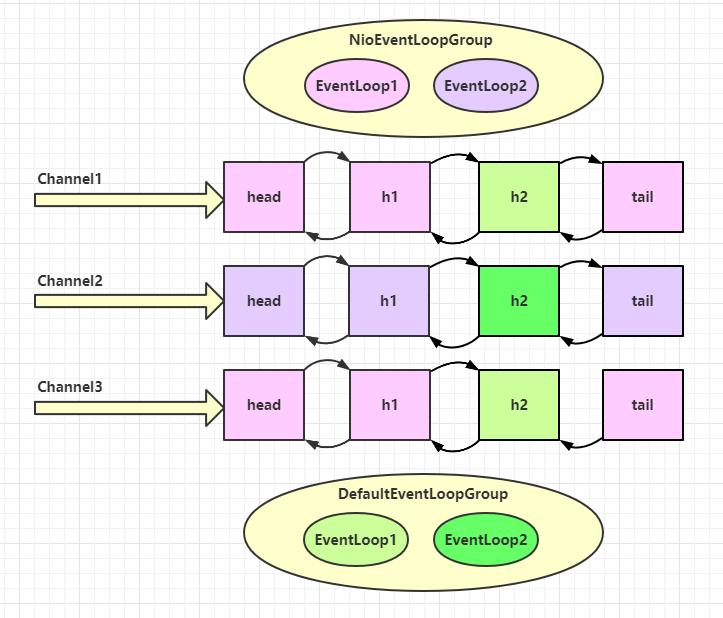
在增加两个非nio的工人
1 2 3 4 5 6 7 8 9 10 11 12 13 14 15 16 17 18 19 20 21 22 23 24 25 26 27 28 29 30 31 32 @Slf4j public class EventLoopServer public static void main (String[] args) EventLoopGroup group = new DefaultEventLoopGroup(); new ServerBootstrap() .group(new NioEventLoopGroup(),new NioEventLoopGroup(2 )) .channel(NioServerSocketChannel.class) .childHandler(new ChannelInitializer<NioSocketChannel>() { @Override protected void initChannel (NioSocketChannel ch) throws Exception ch.pipeline().addLast("handler1" ,new ChannelInboundHandlerAdapter(){ @Override public void channelRead (ChannelHandlerContext ctx, Object msg) throws Exception ByteBuf buf = (ByteBuf)msg; log.debug(buf.toString(Charset.defaultCharset())); ctx.fireChannelRead(msg); } }).addLast(group,"handler2" ,new ChannelInboundHandlerAdapter(){ @Override public void channelRead (ChannelHandlerContext ctx, Object msg) throws Exception ByteBuf buf = (ByteBuf)msg; log.debug(buf.toString(Charset.defaultCharset())); } }); } }).bind(8080 ); } }
客户端代码不变,启动多次,多次调用,结果如下:
1 2 3 4 5 6 7 8 9 10 11 12 13 14 15 16 17 18 11:42:57 [DEBUG] [nioEventLoopGroup-4-1] c.y.n.c.EventLoopServer - 1 11:42:57 [DEBUG] [defaultEventLoopGroup-2-1] c.y.n.c.EventLoopServer - 1 11:43:10 [DEBUG] [nioEventLoopGroup-4-2] c.y.n.c.EventLoopServer - 2 11:43:10 [DEBUG] [defaultEventLoopGroup-2-2] c.y.n.c.EventLoopServer - 2 11:43:23 [DEBUG] [nioEventLoopGroup-4-1] c.y.n.c.EventLoopServer - 3 11:43:23 [DEBUG] [defaultEventLoopGroup-2-3] c.y.n.c.EventLoopServer - 3 11:43:24 [DEBUG] [nioEventLoopGroup-4-1] c.y.n.c.EventLoopServer - 3 11:43:24 [DEBUG] [defaultEventLoopGroup-2-3] c.y.n.c.EventLoopServer - 3 11:43:24 [DEBUG] [nioEventLoopGroup-4-1] c.y.n.c.EventLoopServer - 3 11:43:24 [DEBUG] [defaultEventLoopGroup-2-3] c.y.n.c.EventLoopServer - 3 11:43:27 [DEBUG] [nioEventLoopGroup-4-2] c.y.n.c.EventLoopServer - 2 11:43:27 [DEBUG] [defaultEventLoopGroup-2-2] c.y.n.c.EventLoopServer - 2 11:43:27 [DEBUG] [nioEventLoopGroup-4-2] c.y.n.c.EventLoopServer - 2 11:43:27 [DEBUG] [defaultEventLoopGroup-2-2] c.y.n.c.EventLoopServer - 2 11:43:29 [DEBUG] [nioEventLoopGroup-4-1] c.y.n.c.EventLoopServer - 1 11:43:29 [DEBUG] [defaultEventLoopGroup-2-1] c.y.n.c.EventLoopServer - 1 11:43:30 [DEBUG] [nioEventLoopGroup-4-1] c.y.n.c.EventLoopServer - 1 11:43:30 [DEBUG] [defaultEventLoopGroup-2-1] c.y.n.c.EventLoopServer - 1
从结果可以看出,nio的工人和非nio的工人都绑定了channel,会按照绑定的顺序以次执行,客户端的每次调用同样绑定了EventLoop也就是线程handler之间任务的传递通过 ctx.fireChannelRead(msg) 方法实现,上一个handler需要调用下一个handler的时候执行该方法,不然无法实现调用
💡 handler执行中如何换人 handler如何将任务传递给下一个handler执行,关键代码如下:io.netty.channel.AbstractChannelHandlerContext#invokeChannelRead()
如果两个handler绑定的是同一个线程,那么就直接调用
否则,把要调用的代码封装为一个任务对象,由下一个handler的线程来调用
1 2 3 4 5 6 7 8 9 10 11 12 13 14 15 16 17 18 19 20 21 static void invokeChannelRead(final AbstractChannelHandlerContext next, Object msg) { final Object m = next.pipeline.touch(ObjectUtil.checkNotNull(msg, "msg"), next); // 下一个 handler 的事件循环是否与当前的事件循环是同一个线程 //获取下一个handler事件循环对象(EventLoop) EventExecutor executor = next.executor(); // 是,直接调用,如果下一个事件循环对象也就是EventLoop是当前对象(线程),直接在当前线程中执行方法 if (executor.inEventLoop()) { next.invokeChannelRead(m); } // 不是,将要执行的代码作为任务提交给下一个事件循环处理(换人) //如果不是,需要将任务提交到另外的线程中 else { executor.execute(new Runnable() { @Override public void run() { next.invokeChannelRead(m); } }); } }
Channelchannel的主要作用
close()可以用来关闭channelcloseFuture()用来处理channel的关闭(调用close()方法之后的善后处理)
sync()方法作用是同步等待channel关闭而addListener方法是异步等待channel关闭
pipeline()方法添加处理器 write()方法将数据写入(会将数据写入channel的缓冲区,并不会立刻发出,除非调用了flush方法或者缓冲区数据达到一定容量)writeAndFlush()方法将数据写入并刷出
ChannelFuture
代码如下所示,当调用了connect方法建立连接,会返回一个ChannelFuture对象ChannelFuture对象获取channel对象发送数据connect方法后,立即获取Channel对象,此时的Channel对象是不完整的connect方法建立连接并不是在当前线程去创建连接的,而是会异步处理,也就是发送给BoosEventLoopGroup处理ChannelFuture的sync()方法等待连接建立完毕,此方法会将线程陷入阻塞,直到连接建立完毕ChannelFuture的addListener()方法,封装一个任务对象通过该方法传入,会等待连接建立完毕之后执行任务
1 2 3 4 5 6 7 8 9 10 11 12 13 14 15 16 17 18 19 20 21 22 23 24 25 public class TestClient public static void main (String[] args) throws InterruptedException ChannelFuture channelFuture = new Bootstrap() .group(new NioEventLoopGroup()) .channel(NioSocketChannel.class) .handler(new ChannelInitializer<NioSocketChannel>() { @Override protected void initChannel (NioSocketChannel ch) throws Exception ch.pipeline().addLast(new StringEncoder()); } }) .connect(new InetSocketAddress("127.0.0.1" , 8080 )); channelFuture.addListener(new ChannelFutureListener() { @Override public void operationComplete (ChannelFuture future) throws Exception Channel channel = channelFuture.channel(); System.out.println(channel); } }); } }
CloseFuture
服务端代码不变,客户端代码如下所示channel的时候直接调用close方法,并不会立即关闭,因为这个方法是一个异步方法Channel的 channel.closeFuture() 方法获取 CloseFuture 对象CloseFuture对象的sync()方法进行同步关闭,或者通过 addListener 方法进行异步关闭sync()方法会阻塞当前的调用线程,直到channel关闭结束后addListener()方法则可以将需要Channel关闭后处理的逻辑封装成任务对象,等完全关闭之后会进行回调执行任务
1 2 3 4 5 6 7 8 9 10 11 12 13 14 15 16 17 18 19 20 21 22 23 24 25 26 27 28 29 30 31 32 33 34 35 36 37 38 39 40 41 42 43 44 @Slf4j public class CloseFutureClient public static void main (String[] args) throws InterruptedException NioEventLoopGroup group = new NioEventLoopGroup(); ChannelFuture channelFuture = new Bootstrap() .group(group) .channel(NioSocketChannel.class) .handler(new ChannelInitializer<NioSocketChannel>() { @Override protected void initChannel (NioSocketChannel ch) throws Exception ch.pipeline().addLast(new LoggingHandler(LogLevel.DEBUG)); ch.pipeline().addLast(new StringEncoder()); } }) .connect(new InetSocketAddress("127.0.0.1" , 8080 )); Channel channel = channelFuture.sync().channel(); log.debug("{}" , channel); new Thread(()->{ Scanner scanner = new Scanner(System.in); while (true ){ String line = scanner.nextLine(); if (line.equals("q" )){ channel.close(); break ; } channel.writeAndFlush(line); } }).start(); ChannelFuture closeFuture = channel.closeFuture(); closeFuture.addListener(new ChannelFutureListener() { @Override public void operationComplete (ChannelFuture future) throws Exception log.debug("处理关闭之后的操作" ); group.shutdownGracefully(); } }); } }
💡异步提升的是什么
异步提升的不是效率而是吞吐量
单线程没法异步提升效率,必须配合多线程、多核cpu才能发挥异步的优势
异步并没有缩短响应事件,反而有所增加
合理进行任务拆分,也算利用异步的关键
Future & Promise在异步处理的时候,经常会用到这个两个接口
首先要说明netty中的Future与jdk中的Future同名,但是是两个不同的接口,netty的Future继承自jdk的Future,而Promise又对netty的Future进行了扩展
jdk Future只能同步等待任务结束(或成功、或失败)才能得到结果netty Future可以同步等待任务接口得到结果,也可以异步方式得到结果,但都是要等到任务结束netty Promise不仅有netty Future的功能,而且脱离了任务独立存在,只作为来给你个线程间传递结果的容器
功能/名称
jdk Future
netty Future
Promise
cancel
取消任务
-
-
isCanceled
任务是否取消
-
-
isDone
任务是否完成,不能区分成功失败
-
-
get
获取任务结果,阻塞等待
-
-
getNow
-
获取任务结果,非阻塞,还未产生结果时返回null
-
await
-
等待任务结束,如果任务失败,不会抛异常,而是通过isSuccess判断
-
sync
-
等待任务结束,如果任务失败,抛出异常
-
isSuccess
-
判断任务是否成功
-
cause
-
获取失败信息,非阻塞,如果没有失败,返回null
-
addLinstenter
-
添加回调,异步接收结果
-
setSuccess
-
-
设置成功结果
setFailure
-
-
设置失败结果
jdk Future
1 2 3 4 5 6 7 8 9 10 11 12 13 14 15 16 17 18 19 20 21 @Slf4j public class TestHJdkFuture public static void main (String[] args) throws ExecutionException, InterruptedException ExecutorService service = Executors.newFixedThreadPool(2 ); Future<Integer> future = service.submit(new Callable<Integer>() { @Override public Integer call () throws Exception log.debug("执行计算" ); Thread.sleep(1000 ); return 50 ; } }); log.debug("等待结果" ); log.debug("结果是 {}" ,future.get()); service.shutdown(); } }
netty Future
1 2 3 4 5 6 7 8 9 10 11 12 13 14 15 16 17 18 19 20 21 22 23 24 @Slf4j public class TestNettyFuture public static void main (String[] args) throws ExecutionException, InterruptedException NioEventLoopGroup group = new NioEventLoopGroup(); EventLoop eventLoop = group.next(); Future<Integer> future = eventLoop.submit(new Callable<Integer>() { @Override public Integer call () throws Exception log.debug("执行计算" ); Thread.sleep(1000 ); return 50 ; } }); future.addListener(new GenericFutureListener<Future<? super Integer>>() { @Override public void operationComplete (Future<? super Integer> future) throws Exception log.debug("结果是 {}" ,future.getNow()); } }); } }
Netty Promise
1 2 3 4 5 6 7 8 9 10 11 12 13 14 15 16 17 18 19 20 21 22 23 24 25 26 @Slf4j public class TestNettyPromise public static void main (String[] args) throws ExecutionException, InterruptedException NioEventLoopGroup group = new NioEventLoopGroup(); EventLoop eventLoop = group.next(); DefaultPromise<Integer> promise = new DefaultPromise<>(eventLoop); new Thread(()->{ log.debug("开始计算...." ); try { Thread.sleep(1000 ); } catch (InterruptedException e) { e.printStackTrace(); } promise.setSuccess(80 ); }).start(); log.debug("等待结果...." ); log.debug("结果是:{}" ,promise.get()); } }
Handler & PipelineChannelHandler 用来处理Channel 上的各种事件,分为入站、出站两种,所有ChannelHandler被连成一串,就是Pipeline
入站处理器通常是ChannelInboundHandlerAdapter 的子类,主要用来读取客户端数据,写回结果
出站处理器通常是ChannelOutboundHandlerAdapter的子类,主要对写回结果进行加工
服务端代码:
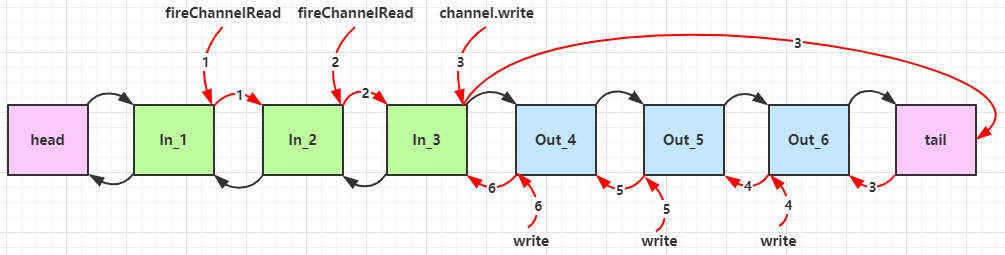
如下代码所示,一共设置了6个处理器,其中1、2、3号处理器是入站处理器,4、5、6号处理器是出站处理器ch.writeAndFlush() 方法进行写出的channel的写出方法,是从pipeline的尾部开始找出站处理器的ctx(ChannelHandlerContext) 的写出方法,则会从当前处理器的位置向前寻找出站处理器
可以看到,ChannelInboundHandlerAdapter是按照addLast的顺序执行的,而ChannelOutboundHandlerAdapter是按照addLast的逆序执行的。ChannelPipeline的实现是一个ChannelHandlerContext(包装了ChannelHHandler)组成的双向链表
入站处理器中,ctx.fireChannelRead(msg)是调用下一个入站处理器
ctx.channel().write(msg)会从尾部开始出发后续出站处理器的执行
类似的,出站处理器中,ctx.write(msg, promise)的调用,也会触发上一个出站处理器
ctx.channel().write(msg) vs ctx.write(msg)
都是触发出站处理器的执行
ctx.channel().write(msg)/(ch.write(msg))从尾部开始查找出站处理器ctx.write(msg)是从当前节点向上找上一个出站处理器3 处的 ctx.channel().write(msg) 如果改为 ctx.write(msg) 仅会打印 1 2 3,因为节点3 之前没有其它出站处理器了
6 处的 ctx.write(msg, promise) 如果改为 ctx.channel().write(msg) 会打印 1 2 3 6 6 6… 因为 ctx.channel().write() 是从尾部开始查找,结果又是节点6 自己
1 2 3 4 5 6 7 8 9 10 11 12 13 14 15 16 17 18 19 20 21 22 23 24 25 26 27 28 29 30 31 32 33 34 35 36 37 38 39 40 41 42 43 44 45 46 47 48 49 50 51 52 53 54 55 56 57 58 59 60 61 @Slf4j public class TestPipeline public static void main (String[] args) new ServerBootstrap() .group(new NioEventLoopGroup()) .channel(NioServerSocketChannel.class) .childHandler(new ChannelInitializer<NioSocketChannel>() { @Override protected void initChannel (NioSocketChannel ch) throws Exception ChannelPipeline pipeline = ch.pipeline(); pipeline.addLast("h1" ,new ChannelInboundHandlerAdapter(){ @Override public void channelRead (ChannelHandlerContext ctx, Object msg) throws Exception log.debug("1" ); super .channelRead(ctx, msg); } }); pipeline.addLast("h2" ,new ChannelInboundHandlerAdapter(){ @Override public void channelRead (ChannelHandlerContext ctx, Object msg) throws Exception log.debug("2" ); super .channelRead(ctx, msg); } }); pipeline.addLast("h3" ,new ChannelInboundHandlerAdapter(){ @Override public void channelRead (ChannelHandlerContext ctx, Object msg) throws Exception log.debug("3" ); super .channelRead(ctx, msg); ch.writeAndFlush(ctx.alloc().buffer().writeBytes("server..." .getBytes())); } }); pipeline.addLast("h4" ,new ChannelOutboundHandlerAdapter(){ @Override public void write (ChannelHandlerContext ctx, Object msg, ChannelPromise promise) throws Exception log.debug("4" ); super .write(ctx, msg, promise); } }); pipeline.addLast("h5" ,new ChannelOutboundHandlerAdapter(){ @Override public void write (ChannelHandlerContext ctx, Object msg, ChannelPromise promise) throws Exception log.debug("5" ); super .write(ctx, msg, promise); } }); pipeline.addLast("h6" ,new ChannelOutboundHandlerAdapter(){ @Override public void write (ChannelHandlerContext ctx, Object msg, ChannelPromise promise) throws Exception log.debug("6" ); super .write(ctx, msg, promise); } }); } }).bind(8080 ); } }
输出:
1 2 3 4 5 6 16:48:27 [DEBUG] [nioEventLoopGroup-2-2] c.y.n.c.TestPipeline - 1 16:48:27 [DEBUG] [nioEventLoopGroup-2-2] c.y.n.c.TestPipeline - 2 16:48:27 [DEBUG] [nioEventLoopGroup-2-2] c.y.n.c.TestPipeline - 3 16:48:27 [DEBUG] [nioEventLoopGroup-2-2] c.y.n.c.TestPipeline - 6 16:48:27 [DEBUG] [nioEventLoopGroup-2-2] c.y.n.c.TestPipeline - 5 16:48:27 [DEBUG] [nioEventLoopGroup-2-2] c.y.n.c.TestPipeline - 4
ByteBuf是对字节数据的封装
创建 1 ByteBuf buf = ByteBufAllocator.DEFAULT.buffer();
创建了一个默认的ByteBuf,容量为netty默认256,也可以通过参数设置初始容量
可以通过下面的方法比较方便的查看ByteBuf中的数据
1 2 3 4 5 6 7 8 9 10 11 private static void log(ByteBuf buffer) { int length = buffer.readableBytes(); int rows = length / 16 + (length % 15 == 0 ? 0 : 1) + 4; StringBuilder buf = new StringBuilder(rows * 80 * 2) .append("read index:").append(buffer.readerIndex()) .append(" write index:").append(buffer.writerIndex()) .append(" capacity:").append(buffer.capacity()) .append(NEWLINE); appendPrettyHexDump(buf, buffer); System.out.println(buf.toString()); }
直接内存 VS 堆内存 Netty默认是使用直接内存
1 ByteBuf buf = ByteBufAllocator.DEFAULT.heapBuffer();
也可以使用下面的代码来创建池化基于直接内存的 ByteBuf
1 ByteBuf buf = ByteBufAllocator.DEFAULT.directBuffer();
直接内存创建和销毁的代价昂贵,但读写性能高(少一次内存复制),适合配合池化功能一起用
直接内存对GC压力小,因为这部分内存不受JVM垃圾回收的管理,但也要注意及时主动释放
池化 VS 非池化 池化的最大意义在于可以重用ByteBuf,优点有
没有池化,则每次都得创建新的ByteBuf实例,这个操作对直接内存代价昂贵,就算是堆内存,也会增加GC压力
有了池化,则可以重用池中ByteBuf实例,并且采用了与jemalloc类似的内存分配算法提升分配效率
高并发时,池化功能更节约内存,减少内存溢出的可能
池化功能是否开启,可以通过下面的系统环境变量来设置
1 -Dio.netty.allocator.type={unpooled|pooled}
4.1以后,非Android平台默认启用池化实现,Android平台启用非池化实现
4.1之前,池化功能还不成熟,默认是非池化实现
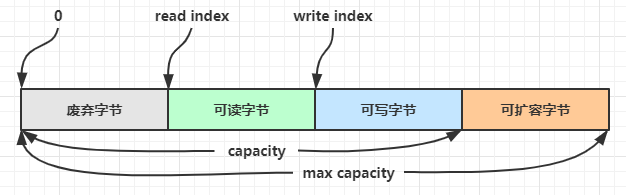
组成 ByteBuf由四部分组成
可扩容字节:在ByteBuf当前容量和最大容量之间的区域,都是可扩容字节,最大容量默认是Integer.MaxValue,可自定义设置
可写字节:初始时,整个ByteBuf都是可写部分,随着数据的写入,可写部分慢慢变少,最后触发扩容
可读字节:数据写入后,已经写入的部分,都是可读部分
废弃字节:数据读取之后的,是废弃部分
写入 方法列表,省略一些不重要的方法
方法签名
含义
备注
writeBoolean(boolean value)
写入一个boolean值
用一个字节01|00代表true|false
writeByte(int value)
写入byte值
writeShort(int value)
写入short值
writeInt(int value)
写入int值
Big Endian,即0x250,写入后00 00 02 05
writeIntLE(int value)
写入int值
Little Endian,即0x250,写入后50 02 00 00
writeLong(long value)
写入 long 值
writeChar(int value)
写入 char 值
writeFloat(float value)
写入 float 值
writeDouble(double value)
写入 double 值
writeBytes(ByteBuf src)
写入 netty 的 ByteBuf
writeBytes(byte[] src)
写入 byte[]
writeBytes(ByteBuffer src)
写入 nio 的 ByteBuffer
int writeCharSequence(CharSequence sequence, Charset charset)
写入字符串
需要指定字符集
注意:
这些方法为指明返回值的,其返回值都是ByteBuf,意味着可以链式调用Big Endian
创建一个ByteBuf
1 buf.writeBytes(new byte[]{1,2,3,4});
结果是:
1 2 3 4 5 6 read index:0 write index:4 capacity:10 +-------------------------------------------------+ | 0 1 2 3 4 5 6 7 8 9 a b c d e f | +--------+-------------------------------------------------+----------------+ |00000000| 01 02 03 04 |.... | +--------+-------------------------------------------------+----------------+
再写入一个int整数,也是4个字节
结果:
1 2 3 4 5 6 read index:0 write index:8 capacity:10 +-------------------------------------------------+ | 0 1 2 3 4 5 6 7 8 9 a b c d e f | +--------+-------------------------------------------------+----------------+ |00000000| 01 02 03 04 00 00 00 05 |........ | +--------+-------------------------------------------------+----------------+
还有一类方法是set开头的一系列方法,也可以写入数据,但不会改变指针位置
扩容 再写入一个int整数时,容量不够了(初始容量是10),这时会引发扩容
扩容规则是 :
如果写入后数据大小未超过512,则选择下一个16的整数倍,例如写入后大小为12,则扩容后capacity是16
如果写入后数据大小超过512,则选择下一个2^n(2的n次方),例如写入后大小为513,则扩容后capacity是2^10=1024(2^9=512已经不够了)
扩容不能超过 max capacity,否则会报错
结果是:
1 2 3 4 5 6 read index:0 write index:12 capacity:16 +-------------------------------------------------+ | 0 1 2 3 4 5 6 7 8 9 a b c d e f | +--------+-------------------------------------------------+----------------+ |00000000| 01 02 03 04 00 00 00 05 00 00 00 06 |............ | +--------+-------------------------------------------------+----------------+
读取 例如读了4次,每次一个字节
1 2 3 4 System.out.println(buffer.readByte()); System.out.println(buffer.readByte()); System.out.println(buffer.readByte()); System.out.println(buffer.readByte());
读过的内容,就属于废弃部分了,再读就只能读那些尚未读取的部分
1 2 3 4 5 6 7 8 9 10 1 2 3 4 read index:4 write index:12 capacity:16 +-------------------------------------------------+ | 0 1 2 3 4 5 6 7 8 9 a b c d e f | +--------+-------------------------------------------------+----------------+ |00000000| 00 00 00 05 00 00 00 06 |........ | +--------+-------------------------------------------------+----------------+
如果需要重复读取int整数5read前先做个标记mark
1 2 buffer.markReaderIndex(); System.out.println(buffer.readInt());
结果
1 2 3 4 5 6 7 5 read index:8 write index:12 capacity:16 +-------------------------------------------------+ | 0 1 2 3 4 5 6 7 8 9 a b c d e f | +--------+-------------------------------------------------+----------------+ |00000000| 00 00 00 06 |.... | +--------+-------------------------------------------------+----------------+
这时如果想要重复读取的话,重置标记位置rest
1 buffer.resetReaderIndex();
这时:
1 2 3 4 5 6 read index:4 write index:12 capacity:16 +-------------------------------------------------+ | 0 1 2 3 4 5 6 7 8 9 a b c d e f | +--------+-------------------------------------------------+----------------+ |00000000| 00 00 00 05 00 00 00 06 |........ | +--------+-------------------------------------------------+----------------+
还有种办法是采用get开头的一系列方法,这些方法不会改变read index
retain & release由于Netty中有堆外内存的ByteBuf实现,堆外内存最好是手动来释放,而不是等GC垃圾回收
UnpooledHeapByteBuf 使用的是 JVM 内存,只需等 GC 回收内存即可UnpooledDirectByteBuf 使用的就是直接内存了,需要特殊的方法来回收内存PooledByteBuf 和它的子类使用了池化机制,需要更复杂的规则来回收内存
回收内存的源码实现,请关注下面方法的不同实现(不同实现释放方式不同)
1 protected abstract void deallocate()
Netty这里采用了引用计数法来控制回收内存,每个ByteBuf都实现了ReferenceCounted 接口
每个ByteBuf对象的初始计数为1
调用release方法计数减1,如果计数为0,ByteBuf内存被回收
调用retain方法计数加1,表示调用者没用完之前,其他handler即使调用了release也不会造成回收
当计数为0时,底层内存会被回收,这时即使ByteBuf对象还在,其各个方法均无法正常使用
因为pipeline的存在,一般需要将ByteBuf传递给下一个ChannelHandler,如果在每个处理器中释放,就失去了传递性(当然,如果在这个ChannelHandler内这个ByteBuf已经完成了它的使命,那么便无须再传递)
基本规则是:谁是最后使用者,谁负责release ,详细分析
起点,对于NIO实现,在 io.netty.channel.nio.AbstractNioByteChannel.NioByteUnsafe#read 方法中首次创建ByteBuf放入pipeline(line 163 pipeline.fireChannelRead(byteBuf))
入站ByteBuf处理原则
对原始ByteBuf不做处理,调用ctx.fireChannelRead(msg)向后传递,这时无须release
将原始ByteBuf转换为其他类型的Java对象,这时ByteBuf就没用了,必须release
如果不调用ctx.fireChannelRead(msg)向后传递,那么也必须release
注意各种异常,如果ByteBuf没有成功传递到下一个ChannelHandler,必须release
假设消息一直向后传,那么TailContext会负责释放未处理消息(原始的ByteBuf)
出站ByteBuf处理原则
有时候不清楚ByteBuf被引用了多少次,但又必须彻底释放,可以循环调用release直到返回true
TailContext释放未处理消息逻辑
1 2 3 4 5 6 7 8 9 10 // io.netty.channel.DefaultChannelPipeline#onUnhandledInboundMessage(java.lang.Object) protected void onUnhandledInboundMessage(Object msg) { try { logger.debug( "Discarded inbound message {} that reached at the tail of the pipeline. " + "Please check your pipeline configuration.", msg); } finally { ReferenceCountUtil.release(msg); } }
具体代码
1 2 3 4 5 6 7 // io.netty.util.ReferenceCountUtil#release(java.lang.Object) public static boolean release(Object msg) { if (msg instanceof ReferenceCounted) { return ((ReferenceCounted) msg).release(); } return false; }
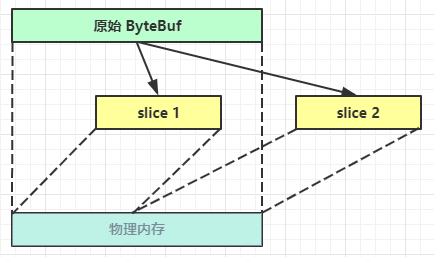
slice【零拷贝】的体现之一,对原始ByteBuf进行切片成多个ByteBuf,切片后的ByteBuf并没有发生内存复制,还是使用原始ByteBuf的内存,切片后的ByteBuf维护独立的read、write指针
调用slice进行切片,无参slice是从原始ByteBuf的read index到write index之间的内容进行切片,切片后的max capacity 被固定为这个区间的大小,因此不能追加write
1 2 3 ByteBuf slice = origin.slice(); System.out.println(ByteBufUtil.prettyHexDump(slice)); // slice.writeByte(5); 如果执行,会报 IndexOutOfBoundsException 异常
带参数的slice方法,则是根据参数指定的下标和长度进行切分ByteBuf和原ByteBuf使用的是同一块内存,所以切分后的ByteBuf如果内容更改,原ByteBuf内容也会更改,如果原ByteBuf指定release方法回收内存,切分的也会被回收内存
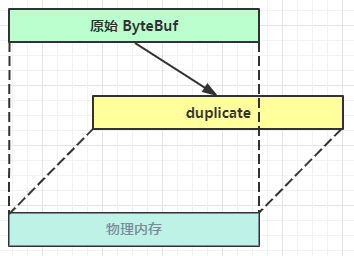
duplicate【零拷贝】的体现之一,就好比截取了原始ByteBuf所有内容,并且没有max capacity的限制,也是与原始ByteBuf使用同一块底层内存,只是读写指针是独立的
copy会将底层内存数据进行深拷贝,因此无论读写,都与原始ByteBuf无关
CompositeByteBuf【零拷贝】的体现之一,可以将多个ByteBuf合并成一个逻辑上的ByteBuf,避免拷贝ByteBuf如下:
1 2 3 4 ByteBuf buf1 = ByteBufAllocator.DEFAULT.buffer(5); buf1.writeBytes(new byte[]{1, 2, 3, 4, 5}); ByteBuf buf2 = ByteBufAllocator.DEFAULT.buffer(5); buf2.writeBytes(new byte[]{6, 7, 8, 9, 10});
输出
1 2 3 4 5 6 7 8 9 10 +-------------------------------------------------+ | 0 1 2 3 4 5 6 7 8 9 a b c d e f | +--------+-------------------------------------------------+----------------+ |00000000| 01 02 03 04 05 |..... | +--------+-------------------------------------------------+----------------+ +-------------------------------------------------+ | 0 1 2 3 4 5 6 7 8 9 a b c d e f | +--------+-------------------------------------------------+----------------+ |00000000| 06 07 08 09 0a |..... | +--------+-------------------------------------------------+----------------+
合并成一个ByteBuf
1 2 3 CompositeByteBuf buf3 = ByteBufAllocator.DEFAULT.compositeBuffer(); // true 表示增加新的 ByteBuf 自动递增 write index, 否则 write index 会始终为 0 buf3.addComponents(true, buf1, buf2);
结果:
1 2 3 4 5 +-------------------------------------------------+ | 0 1 2 3 4 5 6 7 8 9 a b c d e f | +--------+-------------------------------------------------+----------------+ |00000000| 01 02 03 04 05 06 07 08 09 0a |.......... | +--------+-------------------------------------------------+----------------+
CompositeByteBuf 是一个组合ByteBuf,它内部维护了一个Component数组,每个Component管理一个ByteBuf,记录了这个ByteBuf相对于整体偏移量等信息,代表着整体中某一段数据
优点:对外是一个虚拟视图,组合这些ByteBuf不会产生内存复制
缺点,复杂了很多,多次操作会带来性能的损耗
UnpooledUnpooled是一个工具类,类如其名,提供了非池化的ByteBuf创建、组合、复制等操作
这里仅介绍其跟【零拷贝】相关的wrappedBuffer 方法,可以用来包装ByteBuf
1 2 3 4 5 6 7 ByteBuf buf1 = ByteBufAllocator.DEFAULT.buffer(5); buf1.writeBytes(new byte[]{1, 2, 3, 4, 5}); ByteBuf buf2 = ByteBufAllocator.DEFAULT.buffer(5); buf2.writeBytes(new byte[]{6, 7, 8, 9, 10}); // 当包装 ByteBuf 个数超过一个时, 底层使用了 CompositeByteBuf ByteBuf buf3 = Unpooled.wrappedBuffer(buf1, buf2);
输出
1 2 3 4 5 +-------------------------------------------------+ | 0 1 2 3 4 5 6 7 8 9 a b c d e f | +--------+-------------------------------------------------+----------------+ |00000000| 01 02 03 04 05 06 07 08 09 0a |.......... | +--------+-------------------------------------------------+----------------+
也可以用来包装普通字节数组,底层也不会有拷贝操作
1 2 ByteBuf buf4 = Unpooled.wrappedBuffer(new byte[]{1, 2, 3}, new byte[]{4, 5, 6}); System.out.println(buf4.getClass());
输出:
1 2 3 4 5 6 class io.netty.buffer.CompositeByteBuf +-------------------------------------------------+ | 0 1 2 3 4 5 6 7 8 9 a b c d e f | +--------+-------------------------------------------------+----------------+ |00000000| 01 02 03 04 05 06 |...... | +--------+-------------------------------------------------+----------------+
💡ByteBuf优势
池化-可以重用池中ByteBuf实例,更节约内存,减少内存溢出的可能
读写指针分离,不需要想ByteBuf一样切换读写模式
可以自动扩容
支持链式调用,使用更流畅
很多地方体现零拷贝,例如 slice、duplicate、CompositeByteBuf
双向通信 实现一个 echo server
服务端:
1 2 3 4 5 6 7 8 9 10 11 12 13 14 15 16 17 18 19 20 21 22 23 new ServerBootstrap() .group(new NioEventLoopGroup()) .channel(NioServerSocketChannel.class) .childHandler(new ChannelInitializer<NioSocketChannel>() { @Override protected void initChannel(NioSocketChannel ch) { ch.pipeline().addLast(new ChannelInboundHandlerAdapter(){ @Override public void channelRead(ChannelHandlerContext ctx, Object msg) { ByteBuf buffer = (ByteBuf) msg; System.out.println(buffer.toString(Charset.defaultCharset())); // 建议使用 ctx.alloc() 创建 ByteBuf ByteBuf response = ctx.alloc().buffer(); response.writeBytes(buffer); ctx.writeAndFlush(response); // 思考:需要释放 buffer 吗 // 思考:需要释放 response 吗 } }); } }).bind(8080);
客户端:
1 2 3 4 5 6 7 8 9 10 11 12 13 14 15 16 17 18 19 20 21 22 23 24 25 26 27 28 29 30 31 32 33 34 35 NioEventLoopGroup group = new NioEventLoopGroup(); Channel channel = new Bootstrap() .group(group) .channel(NioSocketChannel.class) .handler(new ChannelInitializer<NioSocketChannel>() { @Override protected void initChannel(NioSocketChannel ch) throws Exception { ch.pipeline().addLast(new StringEncoder()); ch.pipeline().addLast(new ChannelInboundHandlerAdapter() { @Override public void channelRead(ChannelHandlerContext ctx, Object msg) { ByteBuf buffer = (ByteBuf) msg; System.out.println(buffer.toString(Charset.defaultCharset())); // 思考:需要释放 buffer 吗 } }); } }).connect("127.0.0.1", 8080).sync().channel(); channel.closeFuture().addListener(future -> { group.shutdownGracefully(); }); new Thread(() -> { Scanner scanner = new Scanner(System.in); while (true) { String line = scanner.nextLine(); if ("q".equals(line)) { channel.close(); break; } channel.writeAndFlush(line); } }).start();
💡读和写的误解 我最初在认识上有这样的误区,认为只有在 netty,nio 这样的多路复用 IO 模型时,读写才不会相互阻塞,才可以实现高效的双向通信,但实际上,Java Socket 是全双工的:在任意时刻,线路上存在A 到 B 和 B 到 A 的双向信号传输。即使是阻塞 IO,读和写是可以同时进行的,只要分别采用读线程和写线程即可,读不会阻塞写、写也不会阻塞读